How to Write a Quote for a Blinds Job
A clear quote is easier to say yes to.
Sign Up
Start your 7-day free trial
Quotes Customers Can Read
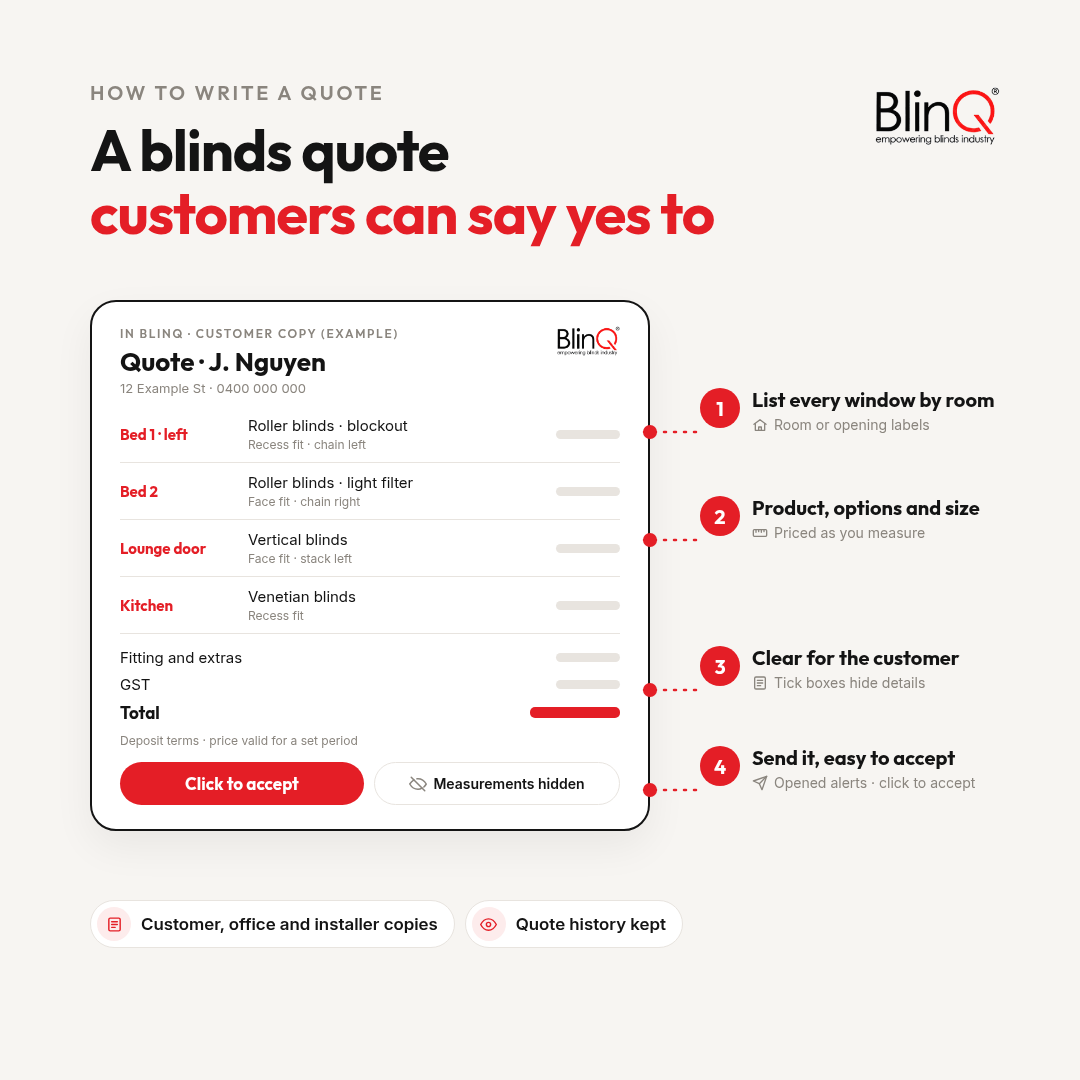
How to write a quote for a blinds job is something many window furnishing businesses still do with a Word template and a calculator. The result is slow and easy to get wrong: a missed room, unclear options or a total that does not add up. Here is how to write a quote for a job that wins work, and how BlinQ builds each part while you measure.
LIST EVERY WINDOW BY ROOM
Start with the customer's name, phone, email and site address, then list each item by room or opening, such as "Bed 1 left window" or "Lounge sliding door". Everyone should know where every product goes.
In BlinQ: each quote item can be labelled by room or window opening, and the quote sits on the customer's record with their contact details, photos and site notes.
SHOW THE PRODUCT, OPTIONS AND SIZE
For each item, state the product, fabric and colour, fit type, control side and the width and drop. Price it from your supplier's price grid plus any options, motors or accessories, rather than estimating.
In BlinQ: as you enter measurements, the system generates accurate pricing from your price grids, so the quote is priced on the spot, not back at the office.
HOW TO WRITE A QUOTE THE CUSTOMER CAN READ
When you work out how to write a quote for a client, aim for a professional document that shows what they need to decide, not your internal workings. Many businesses leave exact measurements off the customer copy and keep them on the office and installer copies. Show fitting, extras, GST and the total clearly, then add your deposit terms and how long the price is valid.
In BlinQ: customise how your quotes look and hide any details, including measurements, from the customer quote with simple tick boxes. Customer, office and installer copies are all generated from the same quote.
SEND IT AND MAKE IT EASY TO SAY YES
Send the quote the same day if you can, then follow up once the customer has had time to read it.
In BlinQ: email the quote in a couple of clicks with a personalised message, see when and how many times it has been opened, and let the customer click and accept. Every change stays in the quote's history.
Try it on your next quote. See pricing:
https://www.blinq.com.au/pricing
Or book a demonstration:
https://calendly.com/blinq/team
How to write a quote
Quote for a job
Quote for a client
Room-by-room items
Price from width and drop
Measurements kept off
Customer, office, installer copies
Quote viewed alerts
Accept in one click
Get Started
Workflow automation software for retailers and manufacturers of blinds, shutters & curtains.